07 September 2026
Whether your SIM got lost along with your phone, snapped in half after one too many SIM tray swaps, or simply stopped working for no obvious reason, the fix is the same: a duplicate SIM issued under your existing number. It's a more common request than people realize, and every major network in Pakistan has a straightforward process for it. Here's exactly how it works.
What a Duplicate SIM Actually Means
A duplicate SIM isn't a new phone number, it's a replacement physical SIM card that gets activated with your existing number once your old card is deactivated. Everything tied to that number, your contacts' saved entry for you, your banking and mobile wallet registrations, your WhatsApp account (once you reinstall and verify it), all continues working exactly as before, since from the network's perspective, it's still the same number, just on a new piece of plastic.
When You'd Need One
A few common situations call for this. Your SIM might be lost along with your phone, physically damaged or snapped, simply stopped reading in any phone despite trying multiple devices, or you might be upgrading from an older 3G only SIM to a newer one that supports 4G or eSIM properly. In every one of these cases, the process is essentially the same, since you're not changing your identity or your number, just getting a working card that represents it again.
Documents You'll Need
Before heading anywhere, make sure you have your original CNIC with you, this is non negotiable, since biometric verification against your CNIC is a mandatory step for every SIM related transaction in Pakistan, no exceptions. If you happen to still have your damaged SIM card, bringing it along can sometimes speed up the process, since staff can visually confirm the SIM number and account details faster than searching purely by your CNIC and name.
Getting a Duplicate SIM at a Franchise
This is the standard and most reliable method across every operator, since biometric verification currently can't be done remotely for this specific process.
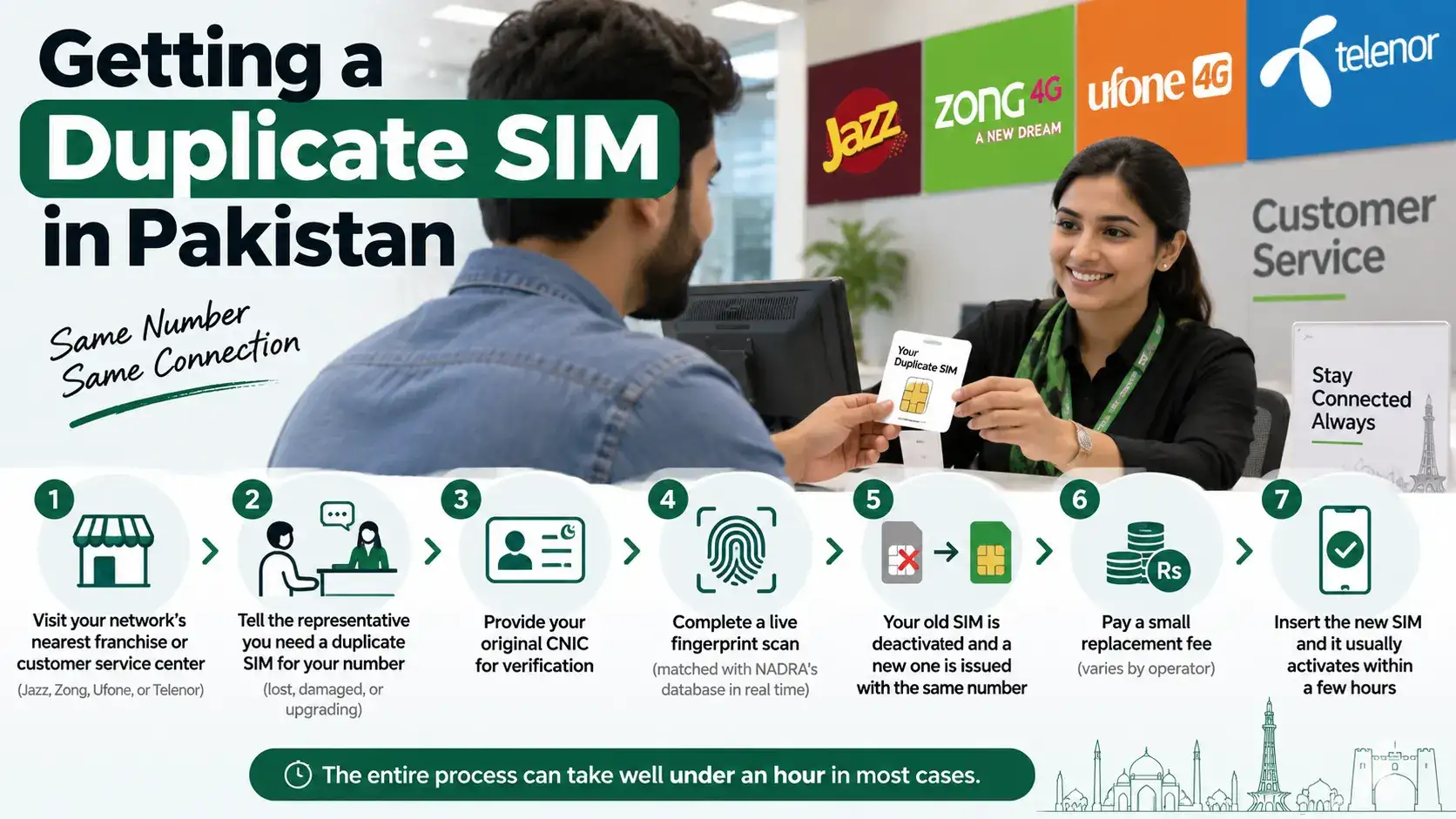
- Visit your network's nearest franchise or customer service center (Jazz, Zong, Ufone, or Telenor, depending on your provider)
- Tell the representative you need a duplicate SIM for your number, and explain briefly why ( lost, damaged, or upgrading )
- Provide your original CNIC for verification
- Complete a live fingerprint scan, which gets matched against NADRA's database in real time to confirm you're the registered owner
- Once verified, the representative deactivates your old SIM and issues a new one carrying your same number
- You'll typically be asked to pay a small replacement fee, which varies slightly by operator
- Insert the new SIM once you leave, and it usually activates within a few hours
If your specific franchise doesn't have you in a queue for too long, this entire process from walking in to walking out with a working SIM can take well under an hour in most cases.
Calling Your Network's Helpline First
Before heading to a franchise, it's worth calling your operator's helpline to flag the situation and, in some cases, get your old SIM temporarily suspended in the meantime so it can't be misused while you're on your way to get a replacement.
- Jazz: Call 111
- Zong: Call 310
- Ufone: Call 333
- Telenor: Call 345
The representative can confirm your account status, suspend the old SIM if it hasn't been already, and let you know if there's anything specific to bring along for your particular case before you head to the franchise.
How Long Activation Takes
Once your duplicate SIM is issued, it generally activates within a few hours, though it can occasionally take up to 24 hours depending on network processing at that moment. If it's been noticeably longer than that and your new SIM still isn't showing any signal or service, it's worth calling the helpline again or returning to the franchise, since this usually points to a processing hiccup rather than something you need to fix on your end.
What Doesn't Transfer Automatically
A duplicate SIM restores your number and basic service, but a few things need separate attention afterward. WhatsApp needs to be reinstalled and re verified using an OTP sent to your restored number, it won't just reappear on its own. If your Easypaisa or JazzCash wallet was linked to your old SIM, it stays tied to your CNIC, but it's worth confirming with the wallet provider's helpline that everything's functioning normally on the new card, especially if you experienced any delay between deactivation and reactivation. Any app using two factor authentication tied to your old SIM will also need to be reconfirmed once your number is active again.
Fees Involved
Duplicate SIM issuance typically comes with a modest replacement fee, and the exact amount can vary slightly between operators and occasionally between prepaid and postpaid accounts. Since these fees do get revised from time to time, it's worth confirming the current amount directly with the franchise staff or your operator's helpline at the time of your visit rather than relying on a figure from an old post or a friend's experience from a while back.
What If You're Not Near Your Registered City?
If you're traveling or living somewhere other than where you originally registered your SIM, you don't need to travel back to your home city for this. Franchises across the country are connected to the same national PTA-linked verification system, so any authorized franchise for your network, regardless of city, can process your duplicate SIM request using the same biometric verification process.
Frequently Asked Questions
Can I get a duplicate SIM online without visiting a franchise?
No, biometric verification currently requires an in person visit to a franchise, since it involves a live fingerprint match against NADRA's database.
Do I keep my same number with a duplicate SIM?
Yes, a duplicate SIM is issued specifically to restore your existing number, not to assign you a new one.
How long does it take for a duplicate SIM to activate?
Usually within a few hours, though it can occasionally take up to 24 hours depending on network processing.
Will my WhatsApp and mobile wallet automatically work again?
WhatsApp needs to be reinstalled and re verified via OTP. Mobile wallets stay linked to your CNIC, but it's worth confirming everything's functioning normally with the provider after the switch.
Can I get a duplicate SIM in a different city than where I originally registered?
Yes, any authorized franchise for your network can process the request, since the verification system is connected nationally, not tied to a specific city.
If Verification Fails or Your Record Can't Be Found
Occasionally, the biometric scan at the franchise doesn't match on the first try, or staff have trouble locating your SIM under the CNIC you've provided. This is more common than you'd think and doesn't necessarily mean something's wrong, fingerprint scanners can struggle with dry skin, minor cuts, or even certain lighting conditions, so asking staff to try a different finger or clean and re scan is worth doing before assuming there's a bigger issue. If your record genuinely doesn't show up under your CNIC, it's worth double checking that you're at the correct network's franchise, since a mix up between similar sounding operator names or a number that was ported to a different network in the past can occasionally cause confusion about which company's system actually holds your active record.
If the issue persists beyond a simple re scan, ask the franchise staff to escalate your case or provide a reference number for the visit, since this gives you something concrete to follow up with if you need to call the helpline afterward or return for a second attempt. It's rarely something that can't be resolved, but having a paper trail from your first visit makes the second one go a lot faster.
Getting a duplicate SIM in Pakistan really just comes down to your CNIC, a quick biometric scan, and a short visit to your network's franchise. Your number stays exactly the same, and within a few hours, you're back up and running with everything reconnected.