Business Desk
 14 August 2026
Checking your Sui Gas bill online in Pakistan is easier than waiting for a paper bill to arrive at your home. Whether you are an SNGPL or SSGC customer, you can check your latest gas bill online, view the amount due, check the due date, and in many cases download or print a duplicate copy.
This is especially useful if your bill has not arrived, you have misplaced it, or you simply want to check your Sui gas bill online before making a payment.
In Pakistan, residential gas customers are mainly served by two major companies: Sui Northern Gas Pipelines Limited (SNGPL) and Sui Southern Gas Company Limited (SSGC). The correct method for checking your bill depends on which company provides gas service in your area.
How to Check Sui Gas Bill Online
The quickest way to check your Sui gas bill is through your gas company's official online service.
For SNGPL Customers
If your gas connection is supplied by Sui Northern Gas Pipelines Limited (SNGPL), you can use the company's online bill service to access your current bill.
Generally, you will need your consumer number or account information printed on a previous SNGPL bill.
Follow these steps:
-
Visit the official SNGPL website.
-
Look for the Bill Inquiry / Get Your Bill option.
-
Enter your required consumer or account details.
-
Submit the information.
-
Your latest SNGPL gas bill should appear on the screen.
-
Check the bill amount, billing month, due date, and other details.
-
Download or print the bill if you need a physical copy.
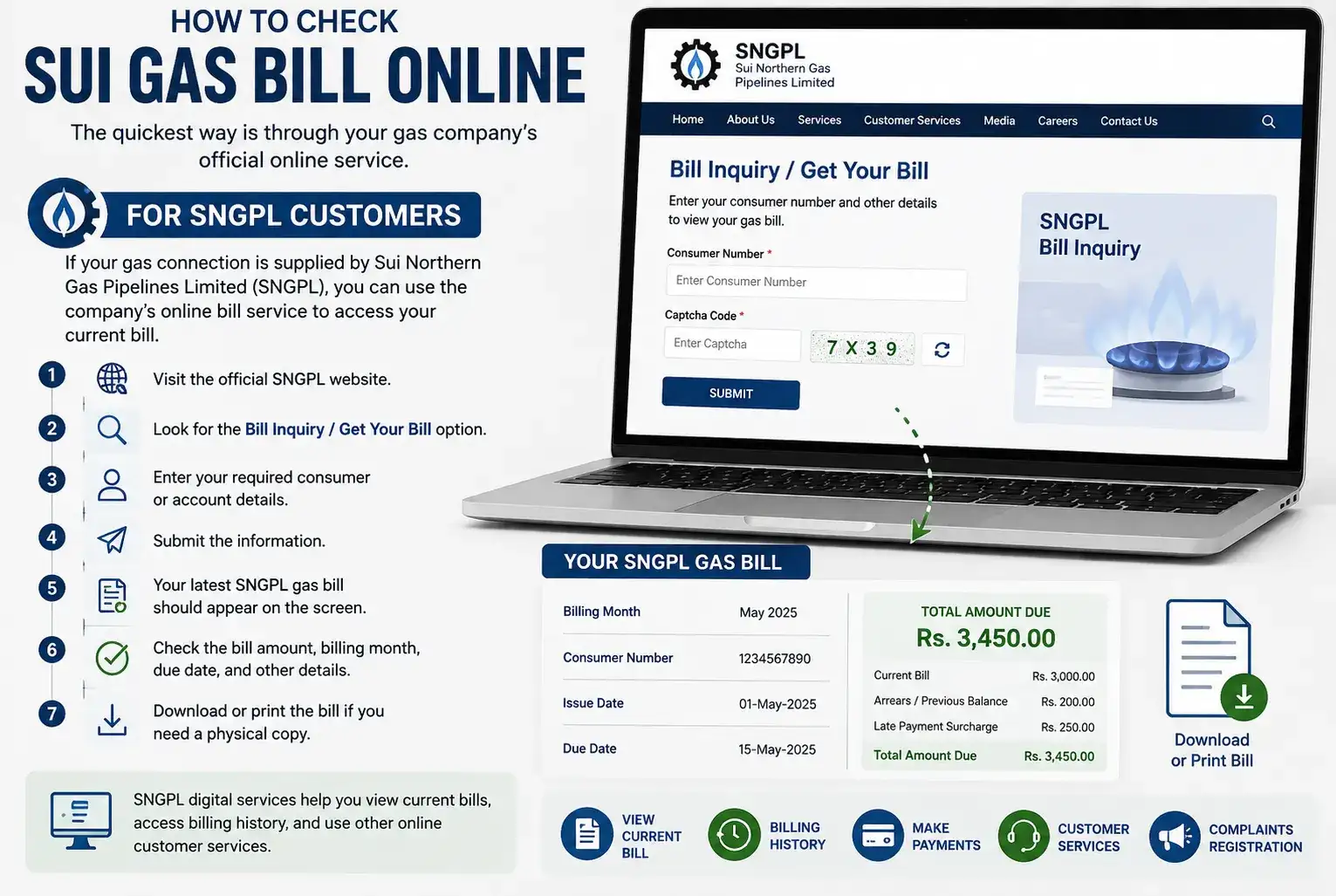
SNGPL also provides digital services that can help customers view current bills, access billing history, and use other online customer services.
For SSGC Customers
If your gas connection is supplied by Sui Southern Gas Company Limited (SSGC), you can check your bill through SSGC's official View Bill service.
The company allows customers to view and download their monthly gas bill in PDF format.
To check your SSGC bill:
-
Open the official SSGC website.
-
Select View Bill.
-
Enter the customer information requested by the website.
-
Submit the details.
-
View your current gas bill.
-
Download the bill as a PDF if required.
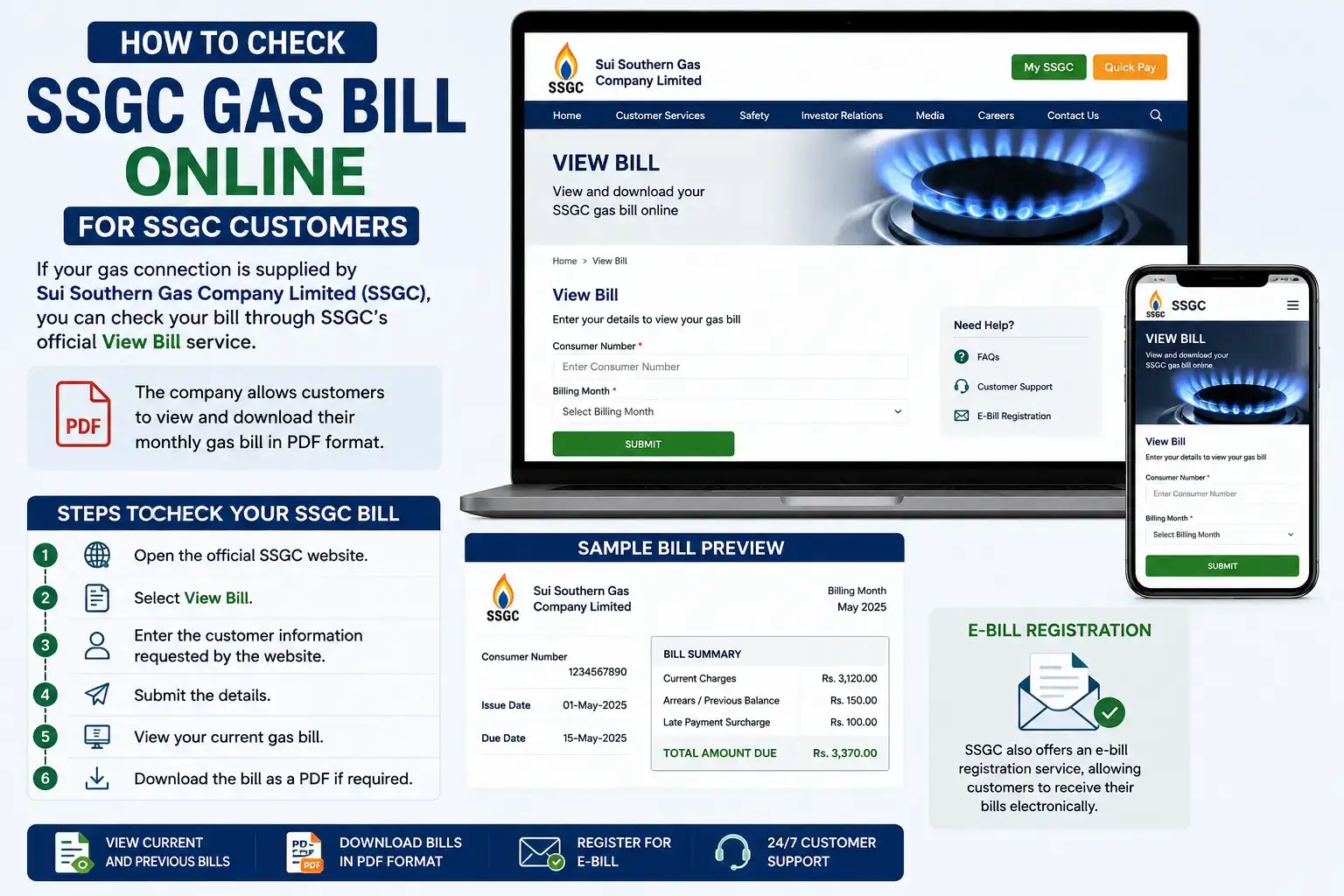
SSGC also offers an e-bill registration service, allowing customers to receive their bills electronically.
What Information Do You Need to Check Your Sui Gas Bill?
The exact information required can vary depending on whether you are an SNGPL or SSGC customer.
Usually, you should have information from an old gas bill available, such as:
-
Consumer number
-
Account ID or customer number
-
Connection details
-
Billing information
Your consumer number is particularly important, so it is a good idea to save a copy of an old bill on your phone or computer.
How to Find Your Sui Gas Consumer Number
If you already have an old gas bill, look near the top section of the bill. The consumer number, account ID, or customer number is normally displayed with your other account information.
If you cannot find your old bill, you may need to contact the relevant gas company or use its customer service facilities.
For SNGPL, customer service information is available through the company's official website. SNGPL lists 1199 among its customer-service contact options.
SSGC also provides customer support and lists 1199 and 99021000 on its website.
How to Download a Duplicate Sui Gas Bill
Lost your gas bill? You usually do not need to wait for the next paper copy.
Both major gas companies provide online options that make it possible to access billing information digitally.
For SNGPL, the company's digital services include options for viewing the current bill and printing a duplicate bill.
For SSGC, the official website provides a View Bill service that lets customers view and download the monthly bill in PDF format.
Once you have downloaded the PDF, you can:
-
Save it on your phone
-
Print it at home
-
Send it to someone else
-
Use the bill details to make an online payment
How to Check Your Sui Gas Bill Without the Paper Bill
One of the biggest advantages of online billing is that you do not necessarily need the physical bill.
If you have your consumer number or account details, you can use the relevant company's online service to access your billing information.
This can be particularly helpful when:
-
Your bill has not been delivered
-
You are traveling
-
You have lost your bill
-
You want to check the bill before the due date
-
You want to confirm the amount you need to pay
Can You Check Previous Sui Gas Bills Online?
In many cases, yes.
Digital billing services can provide access to current and previous billing information. SNGPL has described online and mobile services that provide billing history, while SSGC's Customer Connect service allows customers to view current and previous billing information.
This can be useful if you want to compare your gas consumption from one month to another or investigate an unexpectedly high bill.
How to Check Sui Gas Bill on Mobile
You can also check your gas bill using your smartphone.
For SSGC customers, the SSGC Customer Connect app provides billing information and allows users to view current and previous months' billing details. The company says the app can also be used for complaints and other customer services.
SNGPL has also provided mobile-based consumer services for viewing bills, billing history, duplicate bills, payments, and complaints.
This means you can manage many basic gas-billing tasks without visiting a gas office.
How to Check Sui Gas Bill Amount and Due Date
When you open your online bill, look for the sections showing:
-
Current bill amount
-
Total amount due
-
Due date
-
Previous balance or arrears
-
Billing month
-
Gas consumption
-
Late payment charges, if applicable
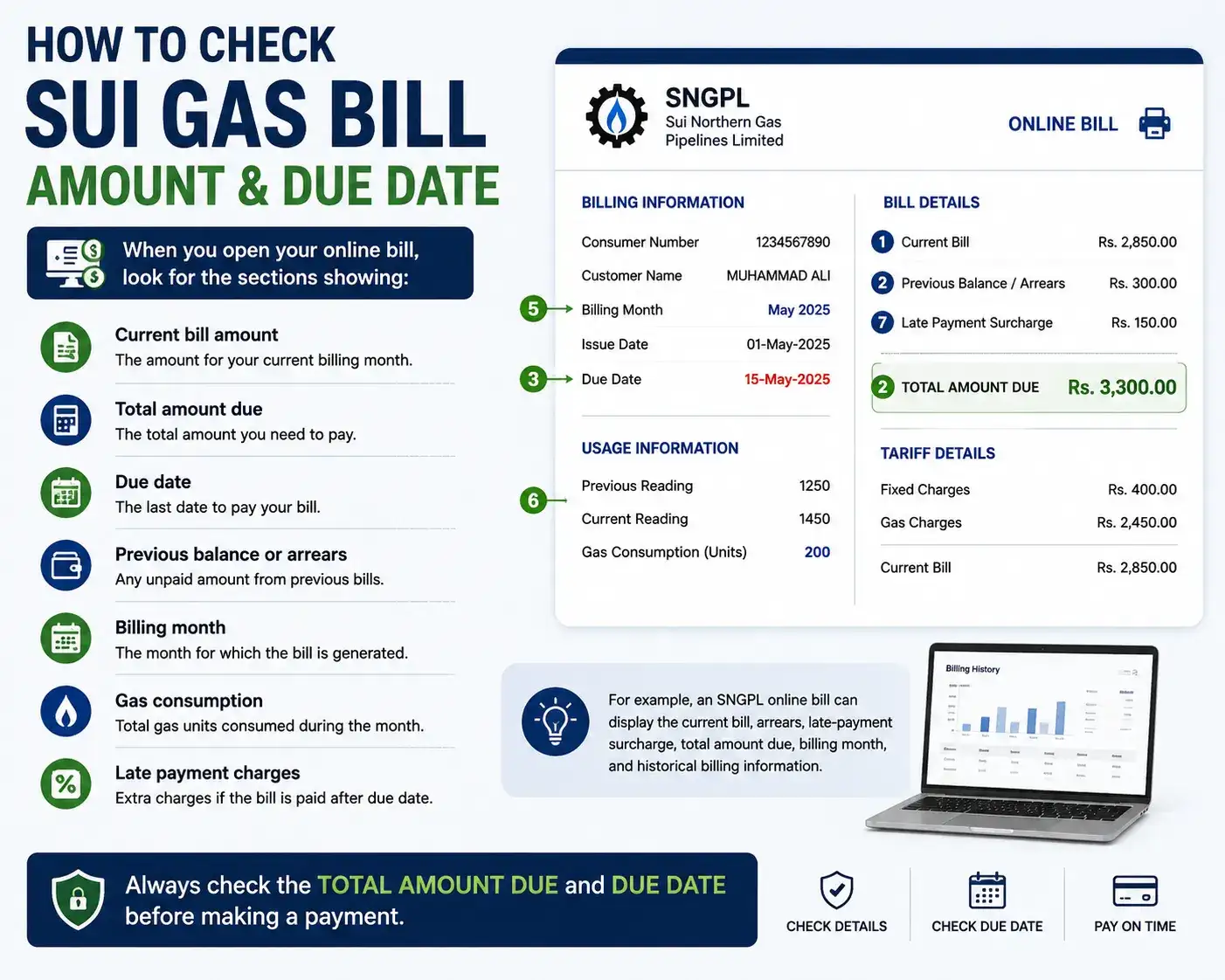
For example, an SNGPL online bill can display the current bill, arrears, late payment surcharge, total amount due, billing month, and historical billing information.
Always check the total amount due and due date before making a payment.
What If My Sui Gas Bill Is Not Showing Online?
Sometimes an online bill may not appear immediately. If this happens, try the following:
-
Double check your consumer or account number.
-
Make sure you selected the correct gas company.
-
Try again after some time if the bill has recently been generated.
-
Check whether you are using the official SNGPL or SSGC website.
-
Contact customer support if the problem continues.
Avoid entering your personal or account information on unknown third-party websites.
SNGPL vs. SSGC: Which Website Should You Use?
The easiest way to know where to check your bill is to identify the company printed on your previous gas bill.
| Gas Company | Main Service Area | Online Bill |
|---|---|---|
| SNGPL | Northern and central parts of Pakistan | Yes |
| SSGC | Southern parts of Pakistan | Yes |
If your old bill says SNGPL, use SNGPL's online billing service. If it says SSGC, use SSGC's official bill service.
Frequently Asked Questions
How can I check my Sui gas bill online?
You can check your Sui gas bill online through the official website of your gas provider. SNGPL and SSGC both provide digital bill services. You will generally need your consumer or account information.
Can I check my Sui gas bill by consumer number?
Yes. Your consumer or account number is commonly used to identify your gas connection and access billing information through the relevant company's online service.
How can I download my Sui gas bill?
Open your gas company's official online bill service, enter the requested account information, and view the bill. SSGC specifically provides an option to view and download the monthly bill in PDF format.
Can I check my Sui gas bill from my mobile phone?
Yes. You can use a mobile browser to access the online billing service. SSGC also offers the Customer Connect app, which includes billing information and billing history.
What should I do if I lose my Sui gas bill?
You can usually access a digital or duplicate version through your gas company's online services. SNGPL has described duplicate-bill functionality, while SSGC provides online bill viewing and PDF downloading.
Can I pay my Sui gas bill online after checking it?
Yes. Online and digital payment options are available through various channels. SSGC lists internet/mobile banking, ATMs, mobile phone payments, credit cards, and other payment methods among its bill payment options.
Quick Answer
To check your Sui Gas bill online, identify your provider (SNGPL or SSGC), visit its official website, enter your consumer/account information, and view your latest bill. You can also download a duplicate bill where the service is available.