Business Desk
 15 August 2026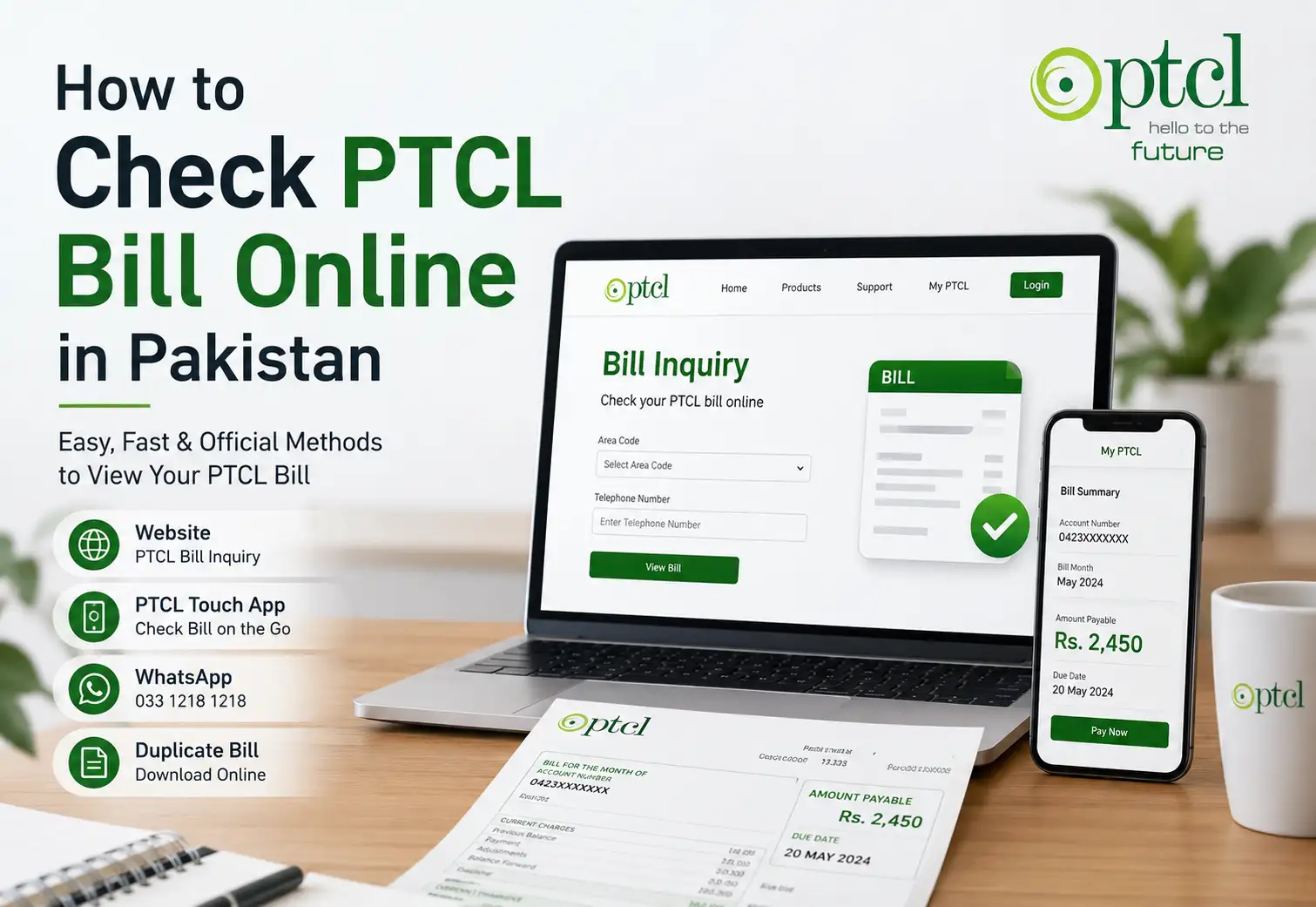
Checking your PTCL bill online is one of the easiest ways to find out how much you need to pay without waiting for a paper bill to arrive. Whether you use PTCL landline, broadband, or another eligible PTCL service, you can check your billing information through PTCL's official online services.
The good news is that you generally only need your PTCL telephone number or MDN, depending on the service you use. PTCL also provides options through its official website, PTCL Touch app, and WhatsApp self-service.
In this guide, we'll explain how to check your PTCL bill online in Pakistan, how to get a duplicate bill, how to check your bill through WhatsApp, and what to do if the online bill service isn't working.
How to Check PTCL Bill Online
The quickest method for most customers is PTCL's official Bill Inquiry service.
Step 1: Open the PTCL Bill Inquiry page
Go to PTCL's official website and open the PTCL Bill Inquiry section.
PTCL Bill Inquiry – Official Website
PTCL's online bill inquiry page provides different options depending on the type of service you have.
Step 2: Select your PTCL service
The bill inquiry page currently provides options for services including:
-
PTCL Landline/VFone Postpaid
-
CharJi/EVO/Vfone/PGL/OTT Prepaid
-
CharJi/EVO Postpaid
-
Telephone and Internet Setup Charges
-
Ufone
For a regular PTCL landline or broadband customer, the relevant option is generally PTCL Landline/VFone Postpaid.
Step 3: Enter your telephone details
For PTCL Landline/VFone Postpaid, the online form asks you to select the appropriate area code and enter your telephone number.
Enter the information carefully and submit the inquiry.
The system can then retrieve your available billing information.
Step 4: Check your bill details
Once your bill information is displayed, you can review the amount payable and other available billing details.
This is useful if you want to confirm your current PTCL bill before making a payment.
How to Check PTCL Bill Through the PTCL Touch App
If you regularly use PTCL services, the PTCL Touch App can be a convenient alternative to checking your bill through a browser.
PTCL's official FAQs explain that customers can use the app for bill inquiry and payment. You can select your service, enter the relevant telephone number or MDN, and view the billing information.
A typical process is:
-
Open the PTCL Touch App.
-
Log in to your account.
-
Go to Bill Inquiry & Payment.
-
Select the PTCL service you want to check.
-
Enter your telephone number or MDN.
-
Submit the inquiry.
-
Review your bill information.
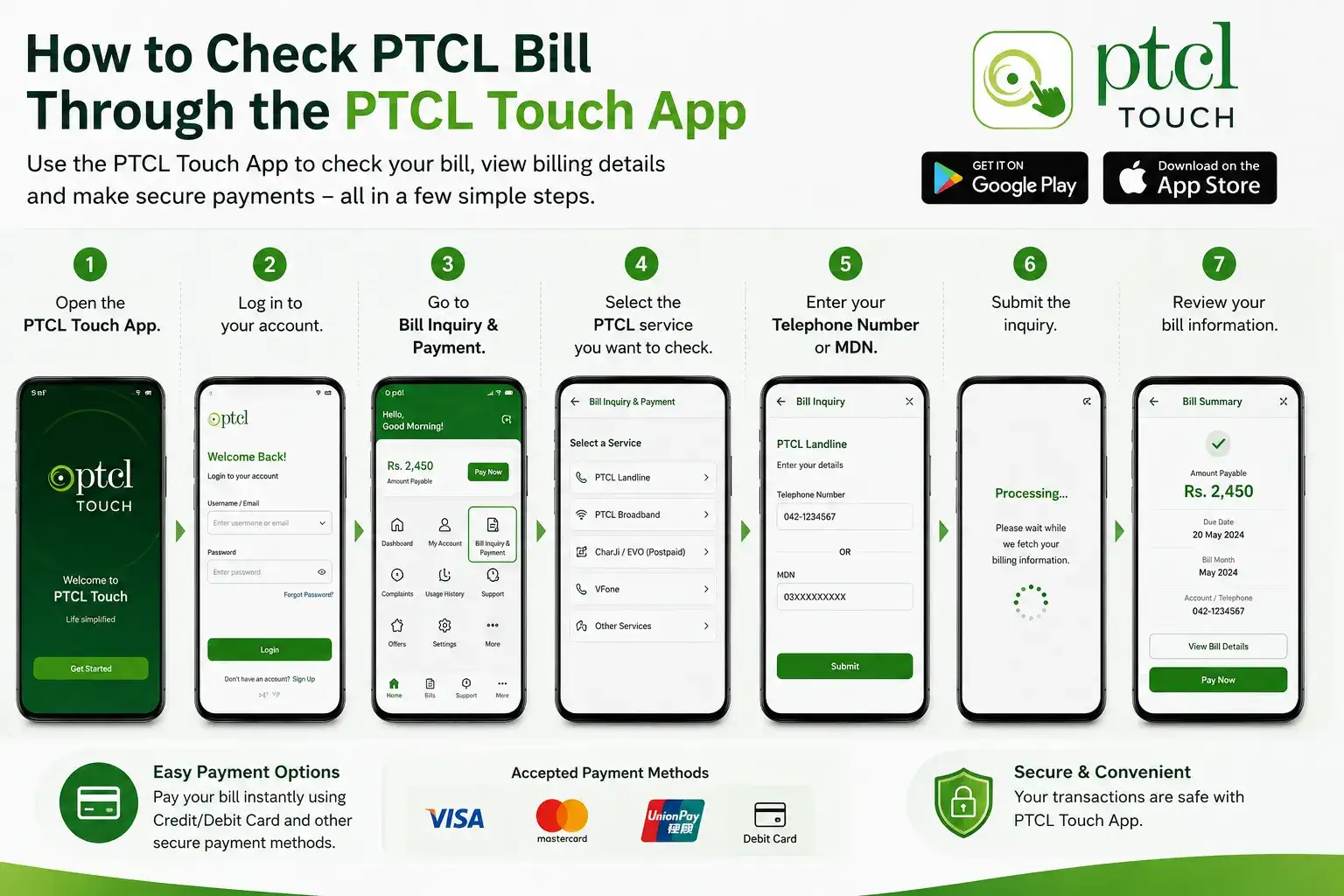
The app also provides payment options, including credit and debit card payments, depending on the service and available options.
How to Get a Duplicate PTCL Bill Online
Lost your PTCL bill or didn't receive the paper copy? You don't necessarily need to visit a PTCL office.
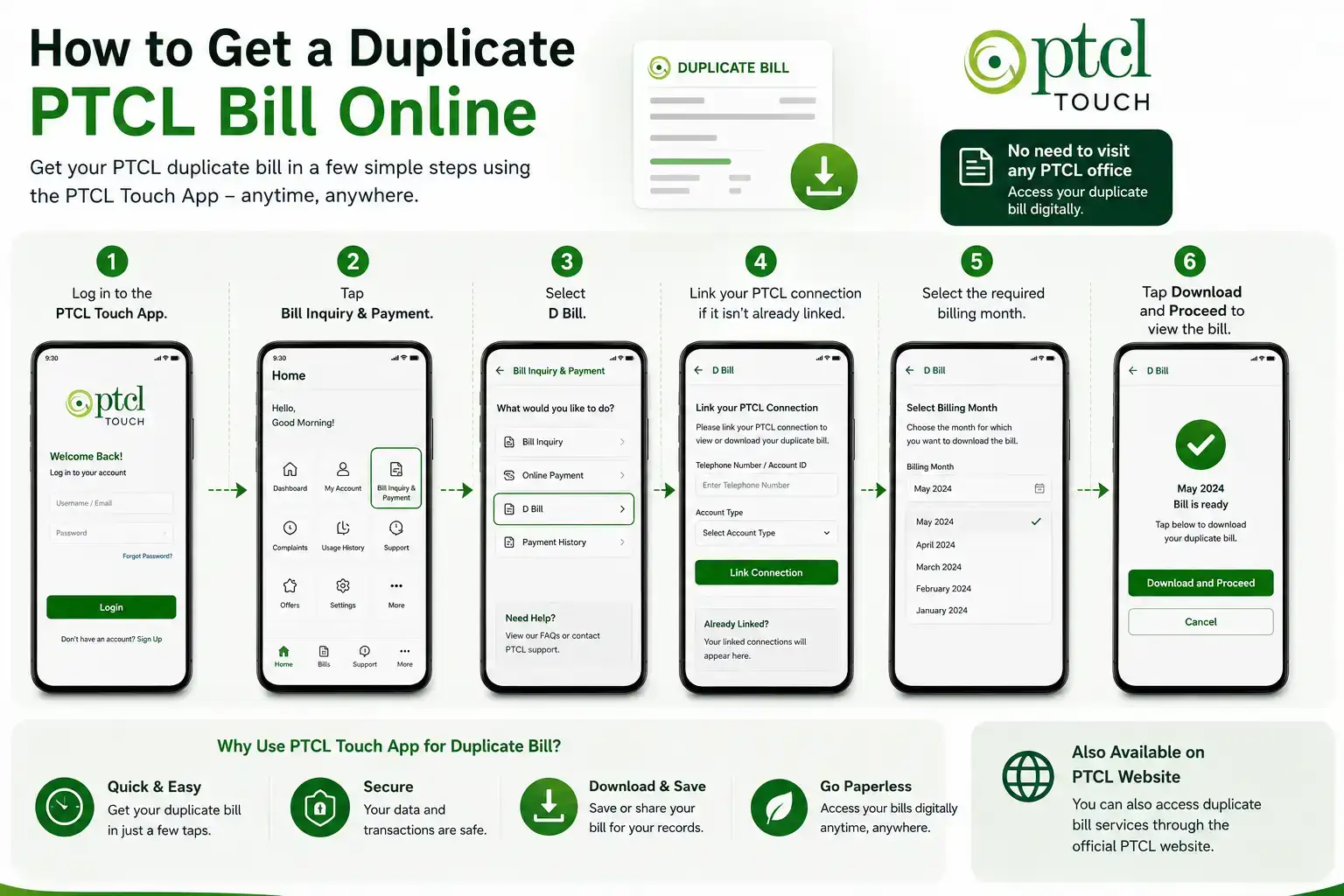
PTCL provides a duplicate bill facility through its digital channels. Its official FAQ explains that customers can use the PTCL Touch App to access a duplicate bill.
To get a duplicate bill through the app:
-
Log in to the PTCL Touch App.
-
Tap Bill Inquiry & Payment.
-
Select D Bill.
-
Link your PTCL connection if it isn't already linked.
-
Select the required billing month.
-
Tap Download and Proceed to view the bill.
You can then save or access the duplicate bill for your records.
PTCL has also historically provided a dedicated duplicate bill service, and its website continues to list duplicate bill access among its digital services.
How to Check PTCL Bill Through WhatsApp
If you prefer using your phone, PTCL also offers an official WhatsApp self-service channel.
According to PTCL, customers can save 033 1218 1218 in their phone contacts and send "Hi" through WhatsApp. The service provides a menu with different options, including Know Your Bill.
Steps to check your PTCL bill on WhatsApp
-
Save 033 1218 1218 in your phone.
-
Open WhatsApp.
-
Send Hi to the PTCL WhatsApp number.
-
Choose the option for Know Your Bill.
-
Follow the instructions shown in the chat.
-
View your billing information.
PTCL says its WhatsApp self service is available for both prepaid and postpaid customers and does not charge a separate fee for using the service, although you still need an internet connection to use WhatsApp.
Tip: Make sure you're using PTCL's official WhatsApp number rather than an unofficial number claiming to provide bill-checking services.
Can I Check My PTCL Bill Without a Paper Bill?
Yes. You don't need to wait for your printed PTCL bill to arrive.
PTCL provides digital channels for bill inquiry, bill payment, duplicate bills, and other customer services. Its official website lists online bill inquiry and payment among its available services.
If you have your PTCL telephone number or other relevant service information, you can usually start the bill inquiry online.
What Information Do I Need to Check My PTCL Bill?
The information you need depends on the PTCL service you're checking.
For a standard PTCL landline/VFone postpaid connection, the official bill inquiry page asks for:
-
Area code
-
Telephone number
For certain wireless or prepaid services, PTCL uses an MDN instead.
If you're unsure which number to enter, check an older PTCL bill or your service information. Using the correct number is important because entering incorrect details can prevent the system from finding your bill.
How to Pay Your PTCL Bill After Checking It
Once you've checked your bill, you can use PTCL's available digital payment options rather than visiting a payment center.
PTCL provides online payment channels and has continued to expand digital payment options for customers. Its digital services information includes online bill payment, quick payment options, the PTCL Touch App, and other digital channels.
If you use the PTCL Touch App, PTCL's official instructions say that customers can select a service, inquire about the bill, and use an available credit or debit card payment option to complete payment.
Before paying, always check:
-
Your current bill amount
-
Due date
-
Account or telephone details
-
Any outstanding balance
-
Whether you're paying the correct PTCL connection
What If My PTCL Bill Is Not Showing Online?
Sometimes an online bill may not appear immediately or the website may temporarily fail to retrieve billing information.
If this happens, try these simple steps:
1. Check your number
Make sure you entered the correct area code and telephone number. For wireless services, check that you're using the correct MDN.
2. Try again later
Temporary website or system issues can prevent a bill inquiry from working.
3. Use the PTCL Touch App
If the website isn't working, try checking your bill through the PTCL Touch App.
4. Try PTCL WhatsApp
You can also use PTCL's official WhatsApp self-service by sending Hi to 033 1218 1218 and selecting the bill option.
5. Contact PTCL
For customer support, PTCL currently lists 1218 as its customer care number and [email protected] as a contact email.
How to Check PTCL Bill Without Internet
If you don't have reliable internet access, online bill checking may not be practical. In that situation, you can contact PTCL customer support or use other available customer-service channels.
PTCL's official website lists 1218 for customer assistance.
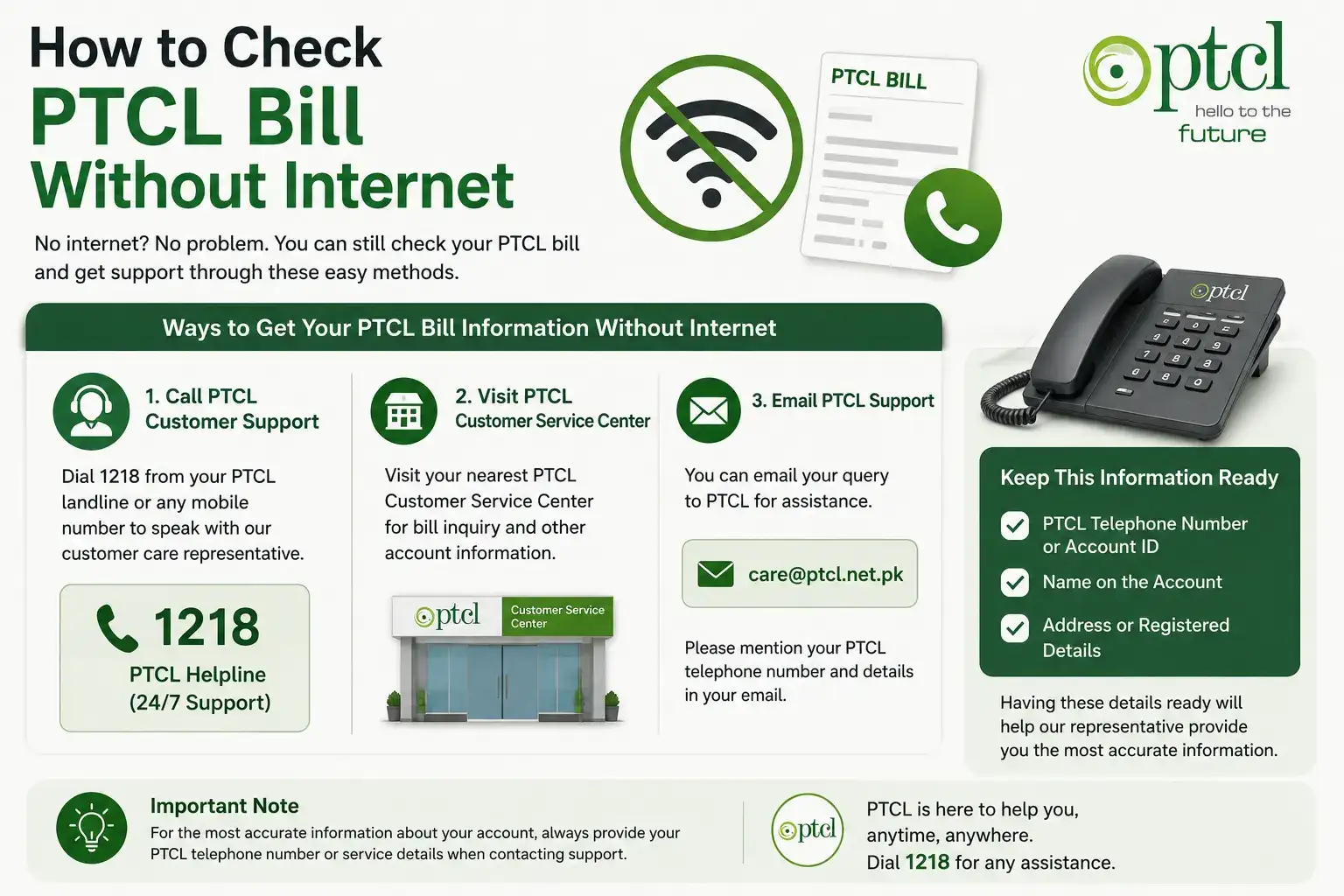
For the most accurate information about your account, keep your PTCL telephone number or service details available when contacting support.
Frequently Asked Questions About PTCL Bill Online
How can I check my PTCL bill online?
You can check your PTCL bill through the official PTCL Bill Inquiry page. For a regular PTCL landline/VFone postpaid connection, you'll generally need to provide the area code and telephone number.
Can I check my PTCL bill by phone?
Yes. PTCL provides digital self-service options through its Touch App and official WhatsApp service. You can also contact PTCL customer support at 1218.
What is the official PTCL WhatsApp number?
PTCL's official website lists 033 1218 1218 for its WhatsApp self-service. Customers can send Hi to access options including bill information.
Can I get a duplicate PTCL bill online?
Yes. PTCL's official FAQ explains that a duplicate bill can be accessed through the PTCL Touch App by going to Bill Inquiry & Payment → D-Bill, linking the connection if necessary, selecting the month, and downloading the bill.
Do I need my CNIC to check my PTCL bill online?
For the standard online bill inquiry, PTCL's current bill inquiry form asks for service specific information such as the area code and telephone number rather than simply asking for a CNIC. Requirements can vary by service and channel.
Can I pay my PTCL bill online?
Yes. PTCL provides online payment options through its digital channels, including the PTCL Touch App and other payment services.
What is the PTCL helpline number?
PTCL currently lists 1218 for customer support on its official website.