Business Desk
 14 August 2026
Standing in line at a bill collection counter or an ATM just to find out how much you owe this month is something most of us try to avoid these days. The good news is you don't have to. Checking your electricity bill online in Pakistan takes less than a minute once you know where to look, and you don't need to visit any office or wait for the paper bill to show up at your door.
Here's a simple breakdown of how to do it, no matter which DISCO you're connected to.
First, Know Your Reference Number
Before you check anything online, you'll need your 14 digit reference number. This is basically your unique identity as an electricity consumer, and every method of checking your bill online depends on it.
You can find this number in a few places:
- On any previous paper bill, usually near the top right corner close to your name and address
- In the SMS you get from your DISCO whenever a new bill is generated
- Some DISCOs label it slightly differently, like "Consumer ID" or "Account Number," but it's the same thing
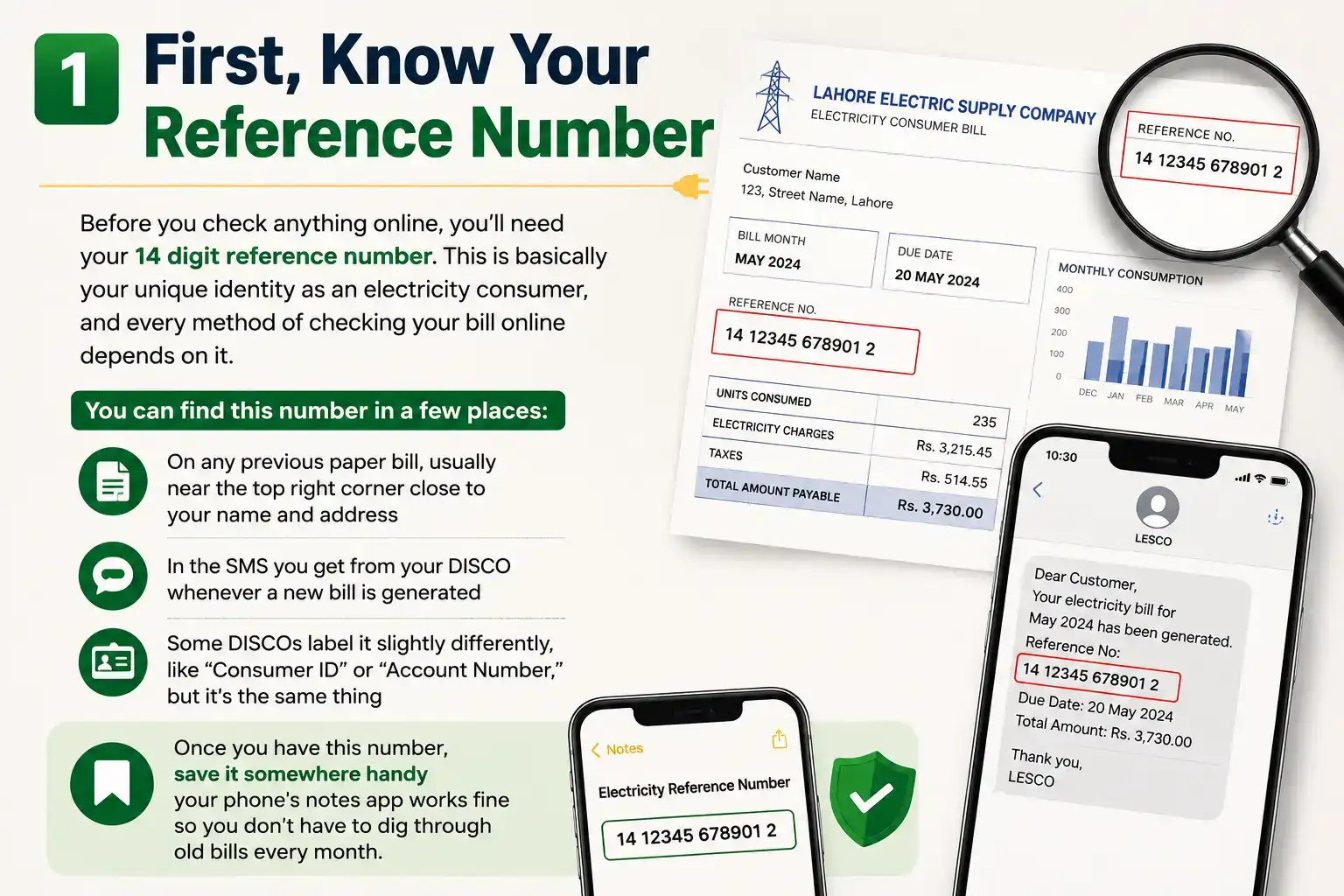
Once you have this number, save it somewhere handy your phone's notes app works fine so you don't have to dig through old bills every month.
Check Your Bill on Your DISCO's Official Website
Pakistan's electricity is distributed through several regional companies known as DISCOs LESCO for Lahore, MEPCO for Multan and the south, FESCO for Faisalabad, IESCO for Islamabad and Rawalpindi, GEPCO for Gujranwala, PESCO for Peshawar, and a few others covering Sindh and Balochistan like HESCO, SEPCO, and QESCO. Karachi is a bit different since it's served by K-Electric, a private company, not a WAPDA DISCO.
Most of these companies route their online bill checking through a centralized system, so the process feels pretty much the same everywhere:
- Go to your DISCO's official website or the shared bill checking portal
- Enter your 14 digit reference number
- Hit "Check Bill" or "View Bill"
- Your current bill will show up on screen, with the option to download or print it
It's worth mentioning that a lot of independent websites now offer this same bill checking service by simply pulling data from the official DISCO system. These can be convenient, especially if you don't remember which specific DISCO website to use, but always double check that the amount and due date match what your DISCO's own portal shows before you pay anything.
Use JazzCash or Easypaisa
If you already use JazzCash or Easypaisa for everyday transactions, checking (and paying) your electricity bill through these apps is probably the fastest option you have.
Here's roughly how it works on JazzCash:
- Open the app and go to "Pay Bills"
- Select "Electricity"
- Choose your DISCO from the list
- Enter your reference number
- Your bill amount and due date will appear instantly, and you can pay right there if you want
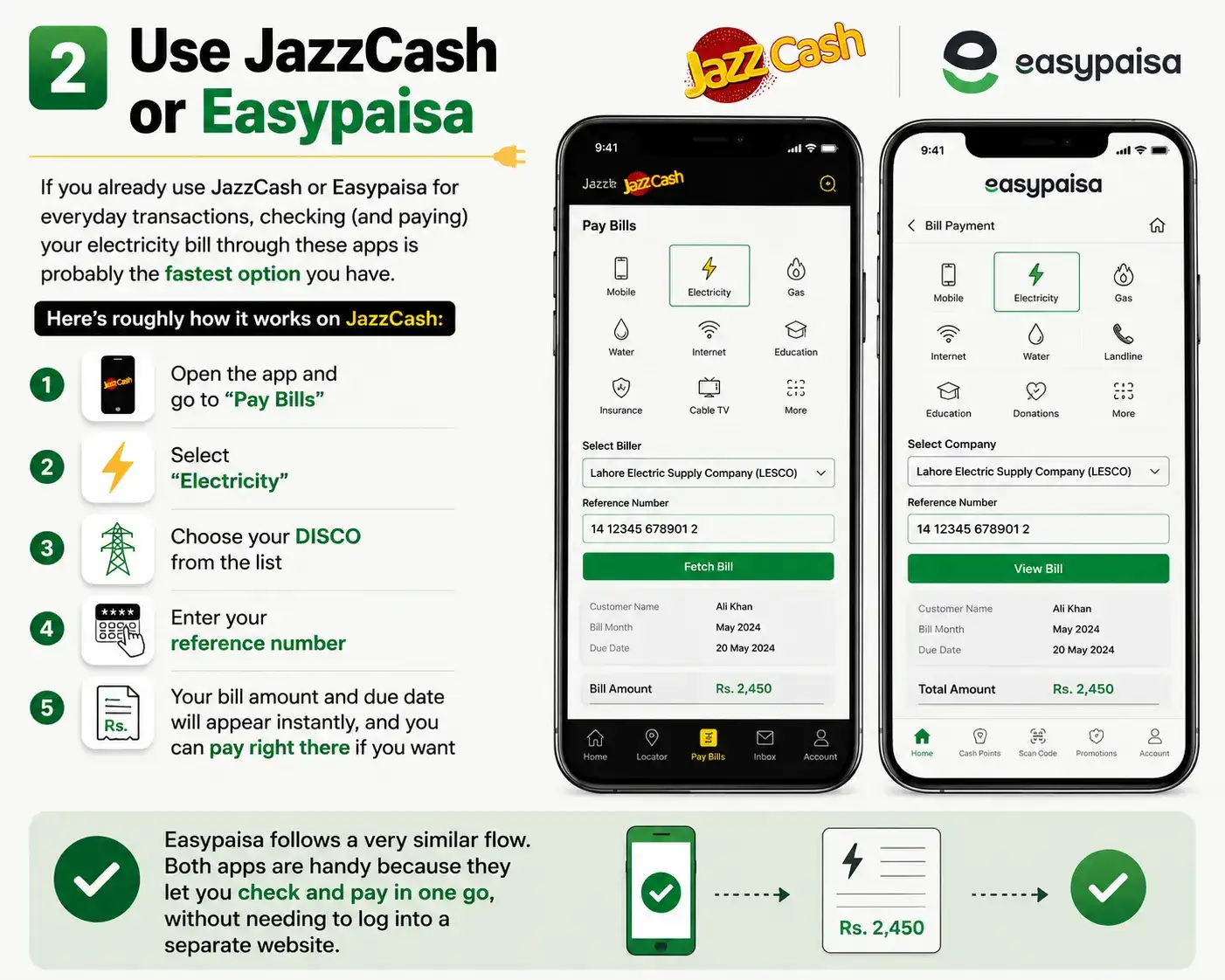
Easypaisa follows a very similar flow. Both apps are handy because they let you check and pay in one go, without needing to log into a separate website.
Check K-Electric Bills Separately
If you're in Karachi, remember that K-Electric works outside the standard DISCO system, so you'll need to use K-Electric's own website or app rather than the general WAPDA bill portals. The process itself is just as simple enter your K-Electric consumer number and your current bill pops up.
A Quick Word of Caution
There are plenty of third party bill checking sites floating around, and most of them are genuinely useful and free to use. But since you're entering personal account details, it's worth sticking to sites that clearly state they don't store or share your reference number, and avoiding anything that asks for extra personal information beyond what's needed to look up a bill. When in doubt, your DISCO's own official website is always the safest bet.
What If You Don't Have Your Reference Number?
This happens more often than you'd think, especially if you've just moved into a new place or misplaced your old bills. If you don't have your reference number on hand, don't worry, you're not stuck.
Check your electricity meter itself first. Many DISCOs also print a reference or account number on a sticker attached to the meter box. If that doesn't work, call your DISCO's helpline (118 is the common number for most Punjab based DISCOs) and give them your name, address, and CNIC number. They can usually pull up your account details over the phone. As a last resort, a quick visit to your local DISCO office with your CNIC will get you sorted in a few minutes.
Understanding What You're Actually Paying For
Once your bill shows up on screen, it's easy to just glance at the total and move on. But knowing what makes up that number can help you spot mistakes and even find ways to lower your usage.
A typical electricity bill in Pakistan includes a few core components: the energy charges based on how many units you used (billed in slabs, so higher usage means a higher rate per unit), a fixed monthly charge regardless of usage, the Fuel Price Adjustment (FPA), which changes month to month based on fuel costs, plus GST, electricity duty, and a TV fee. If a bill suddenly looks way higher than usual, it's worth comparing your meter reading with what's shown on the bill before assuming it's correct. A wrong reading or an estimated bill (common when the meter reader couldn't access your property) can sometimes inflate the amount.
Set Up Reminders So You Never Miss a Due Date
Late payments usually come with a surcharge, and if a bill goes unpaid for too long, it can lead to disconnection. Since you're already checking your bill online, it's worth spending an extra minute setting up a reminder.
Most DISCOs send an SMS alert automatically when a new bill is generated, so if you haven't already, register your mobile number with your DISCO to start receiving these. On top of that, a simple recurring reminder on your phone a few days before the usual due date can save you from late fees, especially useful if your bill amount and due date shift slightly from month to month.
Quick Answers to Common Questions
Can I check my electricity bill without a reference number?
Not directly. You'll need it for any online method, but you can retrieve it through your meter sticker, your DISCO's helpline, or by visiting the local office with your CNIC.
How often are electricity bills updated online?
Bills are usually generated once a month and become available online within a day or two of being issued, right around the time you'd get the SMS alert.
Is it safe to check my bill through a third party website?
Generally yes, as long as the site clearly states it doesn't store your reference number and it's only pulling data from the official DISCO system rather than asking for extra personal details.
Can I check bills for more than one DISCO on the same platform?
Many third party portals let you do this, which is handy if you're checking bills for family members or multiple properties under different DISCOs, without switching between several official websites.
Understanding What's Actually on Your Bill
Once your bill loads on screen, it can look a little overwhelming with all the numbers and abbreviations. But it really breaks down into a few simple parts. There's the energy charge, which is based on how many units you used and which slab you fall into. Then there's a fixed monthly charge that stays the same regardless of usage, plus the Fuel Price Adjustment (FPA), which changes month to month depending on fuel costs. On top of that, you'll see GST, electricity duty, and sometimes a small PTV fee. If your bill suddenly feels a lot higher than usual, it's usually the FPA or a slab jump causing it, not a billing mistake.
Knowing these basics helps you actually understand what you're paying for instead of just glancing at the total and moving on. It also makes it a lot easier to spot something that genuinely looks off.
What to Do If Your Bill Looks Wrong
Sometimes you'll check your bill online and the amount just doesn't add up compared to what you'd normally expect. Before assuming it's an error, take a look at your meter reading and compare it with what's printed on the bill a lot of "wrong bills" turn out to be a slab jump or a higher FPA charge that month rather than an actual mistake.
If the numbers genuinely don't match your usage, you don't have to just accept it and pay. You can file a complaint directly with your DISCO, either by visiting their office or calling their helpline. In Punjab, for instance, 118 works as a general customer care number across all the DISCOs. Keep a copy of your bill and, if possible, a photo of your meter reading handy when you reach out, since it makes the whole process faster.
What Happens If You Miss the Due Date
Life gets busy, and it's easy to lose track of a due date, especially if you're not used to checking your bill regularly. If you miss it, most DISCOs add a small late payment surcharge to your next bill rather than cutting off your connection immediately. That said, if a bill stays unpaid for an extended period, disconnection does become a real possibility, so it's not something to ignore for too long.
If you genuinely can't pay the full amount at once, many DISCOs also offer installment plans for consumers who reach out before things escalate. It's always better to contact them directly and explain your situation than to just let the bill pile up.
Quick Questions People Often Ask
Do I need to create an account to check my bill online?
No. Checking your bill only requires your 14 digit reference number no signup or login needed on most DISCO portals or third party bill checkers.
Can I check last month's bill, not just the current one?
Most portals only show your current, unpaid bill by default. For older bills, you may need to check your SMS history or contact your DISCO directly.
Is checking my bill online free?
Yes, checking your bill is completely free everywhere, whether through your DISCO's website, a third party portal, or JazzCash/Easypaisa. You only pay when you actually settle the bill.
What if I've lost my reference number completely?
You can get it from your DISCO's helpline or by visiting your nearest office with your CNIC and connection details.
Checking your electricity bill online isn't complicated once you have your reference number handy. Whether you use your DISCO's website, a trusted third party portal, or just pull it up through JazzCash or Easypaisa, you can see exactly what you owe and when it's due, all without leaving your house.